想 m3u8 download 但不知道从哪开始?本文是一篇 hub 风格的"选择器指南"——先帮你按场景/工具/平台分流到 4 条实测路径,在每条路径里点对应链接到详细操作页(它们各自专精)。所有路径的共同终点:本地拿到一个可播放的 MP4 文件。读完按你场景选一条,5 分钟内开始下载。
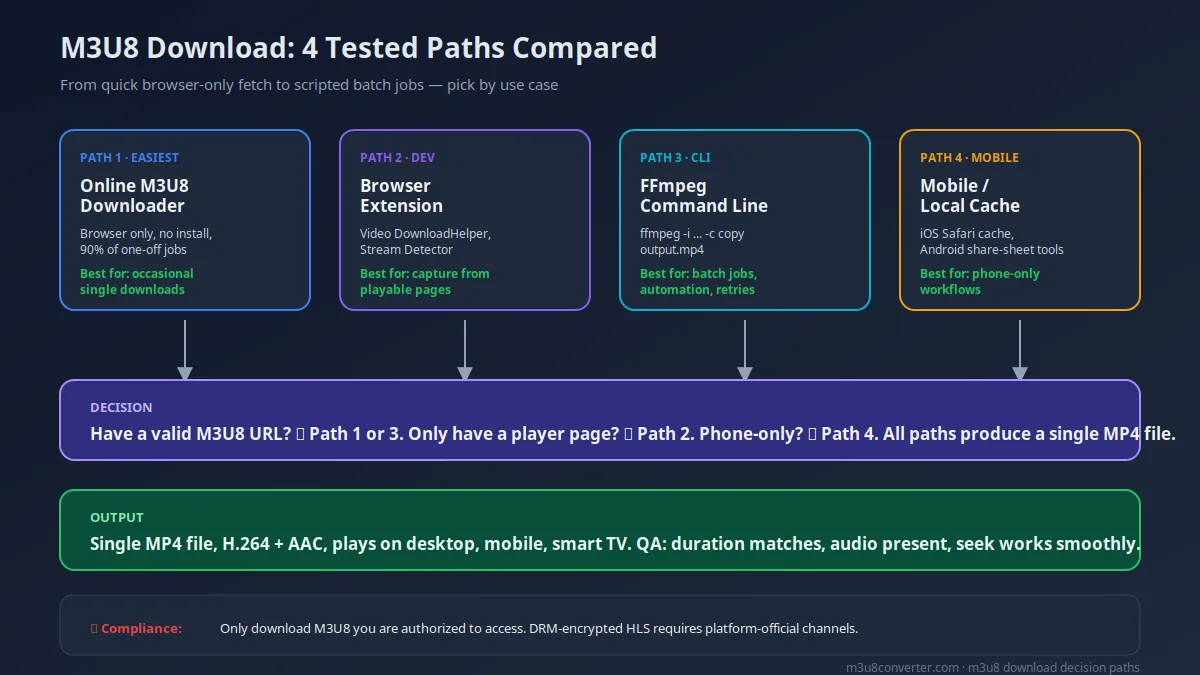
先选路线再开始:M3U8 Download 4 条路径对比
90% 的下载失败都是因为选错路径。下表先帮你按场景分流,避免走错路浪费半小时。每条路径对应一篇专文,点链接跳到详细操作。
| 你的场景 | 推荐路径 | 难度 | 成功率 | 何时切换 |
|---|---|---|---|---|
| 有现成的 m3u8 链接,只需要下载一次 | 在线 M3U8 Downloader(路径 1) | 低 | 高 | 遇到 token 过期或加密时切到 FFmpeg(路径 3) |
| 只有视频播放页,没有 m3u8 链接 | 浏览器扩展 Video DownloadHelper(路径 2) | 低 | 高 | 扩展抓不到时用 DevTools Network 手抓 |
| 需要批量、定时、重试的下载任务 | FFmpeg 命令行(路径 3) | 中 | 高 | 要图形化时改用桌面工具 |
| 手机端、没有 PC、要在 iOS/Android 上下 | 移动端 + 在线工具(路径 4) | 中 | 中 | 遇到 Safari 缓存提取失败时换 Share Sheet 工具 |
| DRM 加密内容(Widevine / FairPlay / PlayReady) | 停止下载,改用平台官方授权离线 | 不适用 | 不适用 | 不要尝试绕过保护 |
路径 1:在线 M3U8 Downloader 工具(最简单)
当你已经拿到 m3u8 链接但不想装任何东西,这是最快路径。直接用 M3U8 Converter 这个浏览器内 m3u8 downloader,粘链接、选 MP4、点开始、等合并、下载。整个过程本地浏览器内跑,文件不上传。
这路径的完整实操、并发下载策略、跨浏览器兼容性测试,见 Online M3U8 Downloader 实战指南。如果你想看从"还没链接"到"在线下载"的端到端流程,先做路径 2 拿到链接,再回到这条。
成功信号: 进度条稳定递增,输出时长接近原片,移动端 / VLC / 桌面播放器都能拖动。
失败信号: 卡在 0%、报 HTTP 403、报 "No M3U8 links found"、合并后没声音。
如果你还没拿到 m3u8 链接,跳到 浏览器提取 M3U8 链接的 5 种方法 或 Get M3U8 Link from URL Online。从"链接 → MP4"完整专文看 M3U8 转 MP4 终极指南。
路径 2:浏览器扩展 Video DownloadHelper(没链接时)
路径 1 假设你手头有 m3u8 链接,但很多场景是"我只想保存这个页面正在播的视频,没链接"。这时装 Video DownloadHelper(Chrome / Firefox 扩展),点播放后扩展图标会亮起,面板里会列出 .m3u8 行。复制链接后再走路径 1 或路径 3。
这路径的完整对比、操作步骤截图、Stream Detector 兜底、错误矩阵,在 Video DownloadHelper 抓 M3U8 实战指南 里讲透了。
成功信号: 图标亮起、面板列出 .m3u8 行、复制链接后粘到工具能正常下载。
失败信号: 图标一直不亮、面板只显示 mp4 / jpg 媒体、只有 master 没分片。
路径 3:FFmpeg 命令行(批量 / 重试 / 自动化)
当你要做的不是"一次下一次"而是"几十个链接、定时跑、自动重试",命令行是更稳的路径。FFmpeg 原生支持 m3u8 输入,两条最常用的命令:
ffmpeg -allowed_extensions ALL -protocol_whitelist "file,http,https,tcp,tls,crypto" \
  -i "https://example.com/playlist.m3u8" -c copy output.mp4
第一条"直接合并不重编码",最快、对源格式无修改;第二条是"重编码"为通用 H.264 + AAC,兼容性最好,适合有异常源的兜底:
ffmpeg -i "https://example.com/playlist.m3u8" -c:v libx264 -c:a aac -movflags faststart output.mp4FFmpeg 在批量下载、断点续跑、参数解释上细节很多,完整版可看 FFmpeg M3U8 命令大全。
成功信号: 控制台无连续 fatal 报错,输出 MP4 在手机 / 桌面都能正常播放,音画同步。
失败信号: Invalid data found、HTTP error 403、音画错位、无音轨。
路径 4:移动端 m3u8 download(手机党)
手机端没有"扩展"概念,常见做法两种:1) 在 Safari / Chrome 复现 PC 端的"链接抓取 + 在线工具"链路;2) 用 Share Sheet 工具直接消费 m3u8。优先选第一种,通用且稳定。
- iOS Safari 打开视频页,先播放触发 HLS 请求。
- 抓 m3u8 链接(用 Safari 调试或第三方工具如 Stream Hub、Offline Player,具体取决于你的 iOS 版本)。
- 把链接粘到 M3U8 Converter,选 MP4,开始转换。
- 下载完成后用 Files App 移到你想要的位置。
Android 链路类似,但 Chrome DevTools 在 Android 上更受限,推荐直接用扩展的同源 PC 浏览器拿到链接,再发到手机上转。详细对比看 Mobile M3U8 Video Download。
成功信号: m3u8 链接能复现到 PC 工具、合并完成、文件能在 Files App / Gallery 中正常播放。
失败信号: iOS 15+ 隐私拦截导致抓不到链接、移动浏览器无法打开工具页面(转用桌面模式请求桌面站点)。
为什么这篇页面独特:M3U8 Download 错误矩阵 + 6 项预检
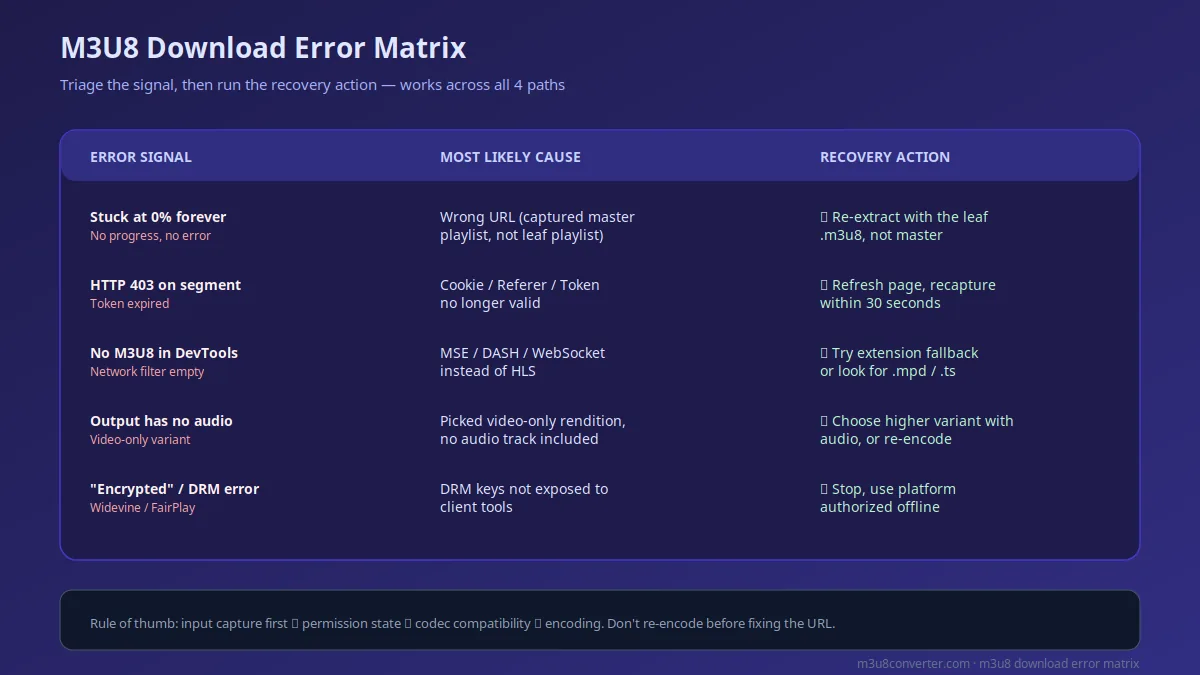
通用教程只会讲"装好工具就完事",但实战中 70% 的下载失败能归到下面 5 类信号。我们把信号、根因、恢复动作列在同一张表,你可以照着打勾定位。所有 4 条路径都适用。这张矩阵是站在路径层面、横切所有工具的"哪条路径都救得回来"指南。
| 错误信号 | 最可能根因 | 优先动作 |
|---|---|---|
| 下载卡在 0% / 完全无进度 | URL 选错:抓到了 master playlist 而不是 leaf 变体 | 用 Stream Detector 重新抓 leaf 链接,不要用 master.m3u8 |
| 分片立刻报 HTTP 403 | Cookie / Referer / Token 失效,链接超过 30 秒 | 刷新源页面,30 秒内重抓,不复用旧链接 |
| DevTools 找不到任何 m3u8 请求 | 页面用 MSE / DASH / WebSocket,不是 HLS | 用扩展兜底(Video DownloadHelper + Stream Detector),或看 .mpd |
| 合并后没声音 / 音画错位 | 选中的变体是 video-only,没有音轨 | 换带 audio codec 的变体,或用 FFmpeg 重编码为 H.264 + AAC |
| 报 "encrypted" / Widevine 错误 | DRM 加密,密钥不向工具暴露 | 停止 m3u8 download,改用平台官方授权离线 |
下载前 6 项预检清单
- 已确认源页面是 HLS 投递:DevTools 里能看到
application/vnd.apple.mpegurl或application/x-mpegurl响应。 - 已实际点击播放(不是 hover 或滚到可视区),扩展图标 / Network 请求正常出现。
- 抓到的链接是 leaf 变体(类似
index.m3u8),不是 master playlist。 - 链接是 30 秒内新抓的,避免 token 过期。
- 目标容器是 MP4(H.264 + AAC),移动端兼容性最好。
- 源页面是公开可访问,不是付费墙 / 登录态后内容,也不是 DRM 加密资源。
常见问题(基于真实查询)
1) m3u8 download 到底是怎么个过程?为什么右键"另存为"不行?
m3u8 不是视频文件本身,而是文本格式的"播放列表",里面列了若干个 .ts 分片的 URL。浏览器拿到 m3u8 后才会逐个拉分片播放,正常右键保存只会保存到 m3u8 文本文件,而不是视频。所以"下载 m3u8 视频"必须经过两个步骤:先抓 m3u8 链接,再把分片合并成单个 MP4。这就是本文 4 条路径的共同本质。
2) download m3u8 跟 download video from m3u8 是一回事吗?
是,这三组词(m3u8 download、download m3u8、download video from m3u8)指的都是同一件事:把 m3u8 播放列表对应的整段视频保存到本地。它们只是用户搜索时不同写法,内容上没区别。本文把这三个都覆盖了,避免你跨多个页面拼信息。
3) download m3u8 to mp4 在线工具有哪些坑?
最常见的三个坑:1) 粘了 master playlist 而不是 leaf 变体,导致卡 0% 或只下到几个分片;2) token 过期,工具反复 403;3) 选中了 video-only 变体,合并出来没声音。三个都有对应解决方法,见上面的错误矩阵和 6 项预检清单。
4) m3u8 downloader 跟 m3u8 to mp4 online 工具是同一个吗?
广义上是同一类工具,但侧重点不同:m3u8 downloader 强调"拿到链接即可下载",m3u8 to mp4 online 强调"在浏览器内完成格式转换"。本文推荐的 M3U8 Converter 同时覆盖两者:既支持输入 m3u8 链接直接下载合并,也能作为 MP4 转换器。完整功能对比看 Online M3U8 Downloader 实战指南。
5) m3u8 download 在 iPhone 上怎么操作?
iOS Safari 没有原生 DevTools,直接抓 m3u8 比较麻烦。推荐路径:用桌面浏览器拿到 m3u8 链接(走路径 1 或 2),再发到手机上用 M3U8 Converter 转换。也可以用 Stream Hub 等第三方 Safari 扩展(取决于 iOS 版本支持)。详细对比看 Mobile M3U8 Video Download。
关联教程与下一步
- Online M3U8 Downloader 实战指南:路径 1 的完整实操对比与并发下载策略。
- 浏览器提取 M3U8 链接的 5 种方法:路径 2 的前置步骤,没链接时先看这个。
- Get M3U8 Link from URL Online:6 种在线提取方法,作为路径 2 的兜底。
- FFmpeg M3U8 命令大全:路径 3 的命令详解和批量脚本。
- Mobile M3U8 Video Download:路径 4 的 iOS / Android 专属方法。
- M3U8 下载报错修复:覆盖更多 403、超时、连接失败场景。
- Video DownloadHelper 官网:路径 2 使用的扩展,认准官方域名避免装到仿冒版本。
- M3U8 转 MP4 终极指南:从整体路径选择到工具取舍的 hub 页面。
- 如何下载 M3U8 视频 (DevTools 步骤教程):DevTools 抓 m3u8 的具体操作流程。
现在就开始:打开 M3U8 Converter 下载你的第一个 m3u8
有链接 → 粘到工具;有播放页 → 装 Video DownloadHelper 抓链接;要批处理 → 复制上面 FFmpeg 命令。所有路径都支持 MP4 / H.264 / AAC 输出,移动端 / 桌面 / 智能电视通用。
打开 M3U8 ConverterLooking to m3u8 download but not sure where to start? This is a hub-style "router guide" — we route you into one of four tested paths based on your scenario, then point you to a dedicated deep-dive for the path you pick. Every path ends at the same place: a single playable MP4 on your local disk. Pick a path, follow the link to the matching deep-dive, and you will be downloading in under five minutes.
Route First: Four Paths Compared for M3U8 Download
90% of m3u8 download failures are routing errors. Use this table to pick the correct path before spending 30 minutes debugging. Each row points to a dedicated guide for that path.
| Your Scenario | Recommended Path | Difficulty | Success Rate | When to Switch |
|---|---|---|---|---|
| You already have a valid m3u8 URL and need a one-off download | Online M3U8 Downloader (Path 1) | Low | High | Switch to FFmpeg (Path 3) on token expiry or encryption |
| You only have the player page, no m3u8 link yet | Video DownloadHelper browser extension (Path 2) | Low | High | Fall back to DevTools Network hand-grab (covered in deep-dive) |
| You need batch, scheduled, or retried downloads | FFmpeg command line (Path 3) | Medium | High | Switch to a desktop GUI when you need visual inspection |
| Phone-only, no PC, iOS or Android | Mobile + online tool (Path 4) | Medium | Medium | Use a Share Sheet tool when Safari cache extraction fails |
| DRM-encrypted content (Widevine / FairPlay / PlayReady) | Stop the m3u8 download, use platform-official offline | N/A | N/A | Do not attempt bypass |
Path 1: Online M3U8 Downloader Tool (Easiest)
When you already have an m3u8 link and want to avoid installing anything, this is the fastest path. Use the in-browser M3U8 Converter: paste the URL, pick MP4, start conversion, wait, download. The whole pipeline runs locally in your browser; the file is not uploaded to any server.
The full walkthrough, parallel download strategy, and cross-browser compatibility tests live in the Online M3U8 Downloader guide. If you need the end-to-end flow "no link yet → online download", do Path 2 first to grab the link, then come back here.
Success signals: progress bar increases steadily, output duration close to source, MP4 plays and seeks on VLC, mobile, and desktop.
Failure signals: stuck at 0%, HTTP 403 errors, "No M3U8 links found", output has no audio.
If you do not have a valid URL yet, jump to 5 ways to extract M3U8 links in browser or Get M3U8 Link from URL Online. For the dedicated "URL to MP4" walkthrough, see the Ultimate M3U8 to MP4 guide.
Path 2: Video DownloadHelper Browser Extension (No URL Yet)
Path 1 assumes you have the m3u8 link in hand. Most real cases are "I just want to save this video that is playing on the page, but I have no link." For this, install Video DownloadHelper (Chrome / Firefox extension). The icon lights up when media is detected; the panel lists the .m3u8 row. Copy the link, then go to Path 1 or Path 3.
The full comparison, step-by-step screenshots, Stream Detector fallback, and error matrix live in Video DownloadHelper for M3U8: Complete Guide.
Success signals: icon lights up, panel shows at least one .m3u8 row, copied link downloads cleanly in your online tool.
Failure signals: icon never lights up, panel only lists mp4 / jpg entries, only master playlist shows.
Path 3: FFmpeg Command Line (Batch / Retry / Automation)
When you are running dozens of links, scheduled jobs, or automated retries, the CLI is the most reliable path. FFmpeg accepts m3u8 input natively; two workhorse commands cover 95% of needs.
ffmpeg -allowed_extensions ALL -protocol_whitelist "file,http,https,tcp,tls,crypto" \
  -i "https://example.com/playlist.m3u8" -c copy output.mp4
The first command remuxes without re-encoding; it is the fastest and preserves the source format. The second command re-encodes to universally compatible H.264 plus AAC, useful as a fallback when the source is messy:
ffmpeg -i "https://example.com/playlist.m3u8" -c:v libx264 -c:a aac -movflags faststart output.mp4FFmpeg in batch download, retry, and parameter tuning is a deep topic; the FFmpeg M3U8 command guide has the full set.
Success signals: no continuous fatal errors, MP4 plays cleanly on phone and desktop, A/V sync is solid.
Failure signals: Invalid data found, repeated HTTP error 403, audio missing, timeline drift.
Path 4: Mobile M3U8 Download (Phone-Only)
Mobile devices do not have browser extensions in the same sense. The two common routes are: 1) replicate the PC "grab URL + online tool" pipeline on the phone; 2) use a Share Sheet tool that consumes m3u8 directly. Prefer the first; it is more universal.
- Open the video page in iOS Safari and play it to trigger the HLS request.
- Extract the m3u8 URL (via Safari Web Inspector or a third-party tool like Stream Hub or Offline Player, depending on iOS version).
- Paste the link into M3U8 Converter, select MP4, and start conversion.
- Move the downloaded file via the Files app to your target location.
Android flow is similar, but Chrome DevTools on Android is more limited; the recommended approach is to extract the link on a desktop browser and send it to your phone for conversion. The phone-specific walkthrough is in Mobile M3U8 Video Download.
Success signals: m3u8 URL works when pasted into the PC tool, conversion completes, file plays in Files app or Gallery.
Failure signals: iOS 15+ privacy blocks the extraction path, the mobile browser cannot load the tool site (switch to request desktop site).
Why This Page Is Unique: M3U8 Download Error Matrix + Six-Point Preflight
Generic tutorials tell you "install the tool and you are done." In practice, 70% of m3u8 download failures map to one of the five signals below. We list signal, root cause, and recovery action in a single matrix, so you can check off the diagnosis. All four paths use the same matrix. The deep-dive articles for each path apply the same triage steps.
| Error Signal | Most Likely Cause | Priority Action |
|---|---|---|
| Download stuck at 0%, no progress | Wrong URL: captured the master playlist, not the leaf variant | Rescan with Stream Detector, copy the leaf-level .m3u8, never the master |
| HTTP 403 the moment a segment downloads | Cookie / Referer / Token validation failed; link is more than 30 seconds old | Refresh the source page, recapture within 30 seconds, do not reuse old URLs |
| DevTools shows no m3u8 requests at all | Page uses MSE / DASH / WebSocket instead of HLS | Use extension fallback (DownloadHelper + Stream Detector), or look for .mpd instead |
| Output MP4 has no audio or A/V drift | Picked a video-only variant, no audio rendition included | Switch to a variant that includes an audio codec, or re-encode to H.264 + AAC |
| "Encrypted" or Widevine error appears | DRM keys are not exposed to client tools | Stop the m3u8 download, use platform-official authorized offline workflow |
Six-Point Preflight Checklist
- Confirm the source is HLS: DevTools shows
application/vnd.apple.mpegurlorapplication/x-mpegurl. - Playback has actually been triggered (not just hover or scroll into view); the extension icon and Network requests appear.
- Captured link is a leaf variant (like
index.m3u8), not the master playlist. - Link was recaptured within 30 seconds to avoid token expiry.
- Target container is MP4 (H.264 + AAC) for the best mobile compatibility.
- Source is publicly accessible, not paywalled / login-only / DRM-encrypted.
FAQ (Query-driven)
1) How does m3u8 download actually work? Why does "Save As" fail?
An m3u8 file is not the video itself. It is a text playlist that lists URLs for individual .ts segments. The browser only starts fetching the segments after it sees the playlist. Plain "Save As" will save the small m3u8 text file, not the video. So every m3u8 download has two steps: grab the m3u8 link, then merge the segments into a single MP4. That is the shared essence of all four paths in this guide.
2) Is "download m3u8" the same as "download video from m3u8"?
Yes. The three variants (m3u8 download, download m3u8, download video from m3u8) all refer to the same operation: save the full video behind an m3u8 playlist to local storage. They are just different phrasings of the same user intent. This guide covers all three, so you do not need to bounce between pages.
3) What are the most common pitfalls with download m3u8 to mp4 online tools?
Three pitfalls cause most failures: 1) pasted the master playlist instead of the leaf variant, leading to a stuck 0% or partial download; 2) the token expired and the tool returns 403; 3) the picked variant is video-only, so the merged MP4 has no audio. All three have a direct fix, listed in the error matrix and six-point preflight above.
4) Is an m3u8 downloader the same as an m3u8 to mp4 online tool?
Broadly, yes, but the focus differs: an m3u8 downloader emphasizes "given a URL, fetch the file", while an m3u8 to mp4 online tool emphasizes "in-browser format conversion". The recommended M3U8 Converter covers both: it accepts an m3u8 link for direct download plus merge, and acts as a browser-side MP4 converter. The full comparison lives in the Online M3U8 Downloader guide.
5) How do I run m3u8 download on iPhone?
iOS Safari has no native DevTools, so extracting the m3u8 link directly is harder. The recommended path is to grab the m3u8 link on a desktop browser (Path 1 or 2), then send it to the phone and use M3U8 Converter for the conversion. Alternatively, use a Safari extension like Stream Hub if your iOS version supports it. The phone-specific walkthrough is in Mobile M3U8 Video Download.
Related Guides and Next Steps
- Online M3U8 Downloader Guide: full path of Path 1 with parallel download strategies.
- 5 ways to extract M3U8 links in browser: prerequisite for Path 2, when you only have a player page.
- Get M3U8 Link from URL Online: six reliable extraction methods, as Path 2 fallback.
- FFmpeg M3U8 command guide: command breakdown and batch scripts for Path 3.
- Mobile M3U8 Video Download: iOS and Android specifics for Path 4.
- M3U8 download error fixes: extended troubleshooting for 403, timeout, and connection failures.
- Video DownloadHelper official site: the Path 2 extension, install only from the official domain.
- Ultimate M3U8 to MP4 guide: hub page for route selection and tooling tradeoffs.
- How to Download M3U8 Video (DevTools step-by-step): specific DevTools workflow for grabbing the m3u8 link.
Start Now: Open M3U8 Converter for Your First m3u8 Download
Got a link → paste it. Got a player page → install Video DownloadHelper to grab the link. Need batch → copy the FFmpeg command above. All paths output MP4 / H.264 / AAC that plays on desktop, mobile, and smart TV.
Open M3U8 Converter